An n8n error workflow starts with Error Trigger and is selected in the monitored workflow’s Settings. It can record a failed automatic execution without replaying the business actions that failed. This guide builds a small failure log with an event key, a review path for missing IDs, and a database constraint that prevents duplicate records.
What you need before setting up the n8n error workflow
You need permission to edit both workflows and an audit store that supports atomic inserts with a unique key. Use an existing test database if you follow the PostgreSQL example below. A sheet lookup followed by an append can race when two executions run together; it does not provide the same uniqueness guarantee.
These steps use the Error Trigger and JavaScript Code nodes documented by n8n. Menu names can vary with the installed version. The log stores identifiers and a node name, rather than copying the full error message, which may contain personal data or credentials.
- Monitored workflow fails during an automatic execution.
- Its configured Error Trigger handler receives failure details.
- Code produces an event key or marks the event for review.
- The audit store inserts a new key once; a repeated key leaves the existing record intact.
1. Create and attach the error handler
- Create a separate workflow called Error Handler and add Error Trigger first.
- Save it, then open the workflow you want to monitor.
- Open its Settings, select Error Handler under Error workflow, and save.
- In the handler, add a JavaScript Code node after Error Trigger and choose Run Once for All Items.
The error handler itself does not need to be published. To test it, make the monitored workflow fail through an automatic trigger; a manual Execute workflow run does not fire Error Trigger. These details are specified in the Error Trigger documentation.
2. Normalize the documented payloads
A failure in a later node normally identifies the failed run in execution.id. A trigger failure can instead provide details in trigger.error, with no execution ID or URL. The example below reads either shape; it assumes the single event item supplied by Error Trigger.
const p = $input.first().json;
const execution = p.execution || {};
const triggerError = p.trigger?.error || {};
const workflowId = p.workflow?.id == null ? '' : String(p.workflow.id);
const executionId = execution.id == null ? '' : String(execution.id);
const node = String(execution.lastNodeExecuted || triggerError.node?.name || '');
const stamp = triggerError.timestamp;
let eventKey = null;

if (workflowId && executionId) {
  eventKey = JSON.stringify(['execution', workflowId, executionId]);
} else if (workflowId && node && stamp != null) {
  eventKey = JSON.stringify(['trigger', workflowId, node, String(stamp)]);
}

return [{ json: {
  event_key: eventKey,
  needs_review: eventKey === null,
  workflow_id: workflowId,
  execution_id: executionId || null,
  retry_of: execution.retryOf == null ? null : String(execution.retryOf),
  node
} }];
Add an If node after Code. When needs_review is true, keep the event in a private review path and investigate the missing identifiers. Otherwise, pass it to the audit store. The fallback trigger key is best effort: indistinguishable failures with the same workflow, node, and timestamp can collide. A retry with a new execution ID receives its own key, while retry_of links it to the earlier run.
3. Prevent duplicate rows at the storage boundary
For PostgreSQL, create a dedicated test table once with a database account allowed to create it:
CREATE TABLE n8n_failure_audit (
  event_key text PRIMARY KEY,
  workflow_id text NOT NULL,
  execution_id text,
  retry_of text,
  node text NOT NULL
);
Connect the valid-event branch to a Postgres node using Execute Query. Use this parameterized insert:
INSERT INTO n8n_failure_audit
  (event_key, workflow_id, execution_id, retry_of, node)
VALUES ($1, $2, $3, $4, $5)
ON CONFLICT (event_key) DO NOTHING;
In Options > Query Parameters, switch the field to an expression and supply this array in the same order:
{{ [ $json.event_key, $json.workflow_id, $json.execution_id, $json.retry_of, $json.node ] }}The primary key rejects duplicates at the database boundary. ON CONFLICT (event_key) handles that particular collision; connection failures or other database errors still require attention. Keep values in the parameter array rather than concatenating them into SQL. n8n documents query parameters, and PostgreSQL documents ON CONFLICT.
4. Run a failure test without real business actions
- Create an isolated monitored workflow with an automatic trigger and a Stop And Error node. Set its error message to a harmless test label.
- Select Error Handler in that workflow’s Settings. Configure and publish or activate the monitored test workflow as required by its trigger and your n8n version.
- Let the automatic trigger run. Compare its failed execution ID with the handler’s output and the stored row.
- Using a separate test input path, replay the same captured payload twice. Query the table and confirm that its event key appears once.
- Test a payload with a different execution ID and a
retryOfvalue. Confirm it produces a second record, with the earlier ID retained as the retry link. - Disable the isolated automatic test trigger when finished.
| Input identity | Expected decision |
|---|---|
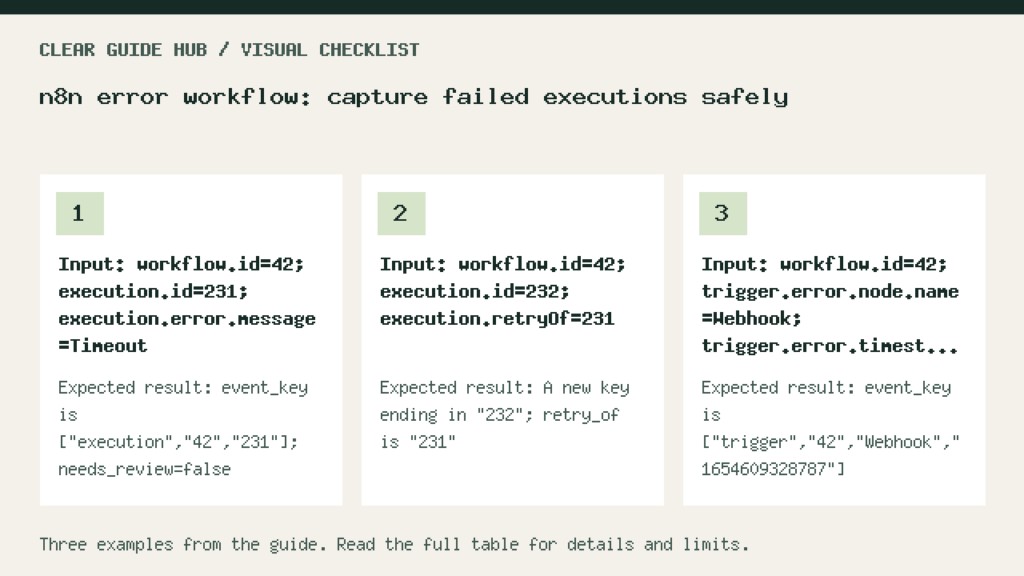
| workflow=42; execution=231 | Key ["execution","42","231"]; insert once. |
| workflow=42; execution=232; retryOf=231 | A different key; retry link remains 231. |
| workflow=42; node=Webhook; trigger timestamp=1654609328787 | A best-effort trigger key; inspect its limitations. |
| No usable execution or trigger identity | event_key=null; route to review. |
The normalizer has been checked locally against these synthetic inputs. That checks the JavaScript logic, not your credentials, installed nodes, automatic trigger, or database connection. Complete the isolated n8n test before relying on the handler in production.
Common failures and important limits
- No handler execution: check the selected error workflow and confirm that an automatic execution actually failed. A node configured to continue after an error may leave the workflow successful.
- Missing ID: inspect the trigger payload and whether the failed execution was saved. Do not invent an execution ID.
- Duplicate log rows: verify the unique constraint; a read-before-write lookup alone cannot prevent concurrent duplicates.
- The handler’s storage node fails: inspect the handler execution itself. A log pipeline also needs monitoring.
- The original task needs retrying: design that separately around the task’s side effects and idempotency. This handler records failures; it does not authorize repeating payments, messages, or writes.
For the separate question of coordinating automation steps, see our n8n toolchain example. For a simple rule that may remove the need for an automation, see Gmail receipt filters.
For a concrete workflow to monitor, see the Gmail-to-Sheets automation example. Attach the error handler to an isolated copy first; logging a failure does not undo or safely replay a row that the business workflow already wrote.