AI workflow integration means embedding multiple AI tools and agents into your business processes with minimal friction. Done right, it improves productivity and connects diverse systems. Practical integration requires careful planning, picking suitable standards, and using flexible frameworks to combine tools without breaking workflows.
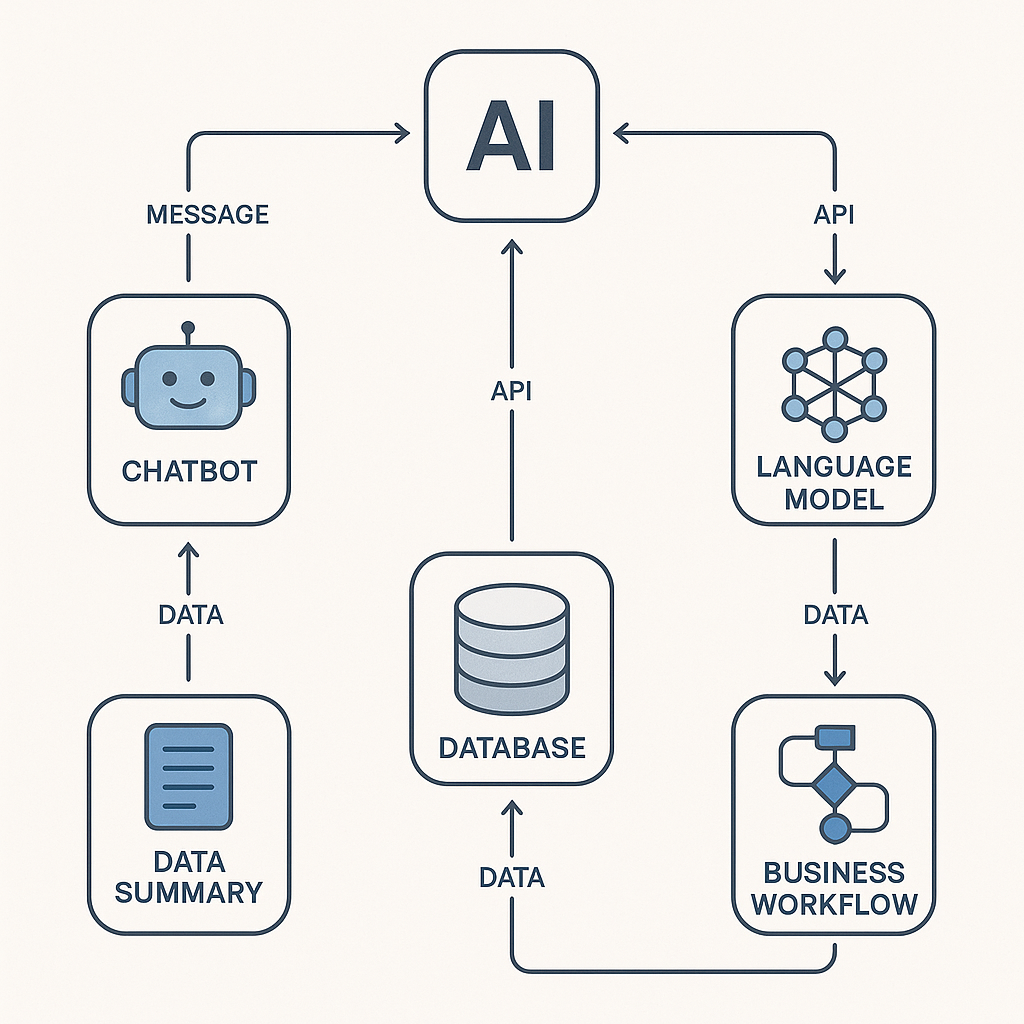
Why AI Workflow Integration Matters
Modern businesses often use various AI solutions—such as chatbots, analytics, and language models—across different teams. Without a strategy for integration, these tools become isolated, leading to duplicated efforts and missed insights. Efficient AI workflow integration brings these capabilities together, unlocking value by enabling communication, data-sharing, and streamlined operations.
Step 1: Map Existing Workflows and Identify Integration Points
Begin by mapping current workflows, highlighting tasks automated with AI and areas where AI could be embedded. List the existing tools, their inputs and outputs, and dependencies. This blueprint exposes gaps and shows where integration can have the most impact.
| AI Task | Current Tool | Inputs Required | Outputs Produced |
|---|---|---|---|
| Email Classification | Custom LLM | Email text | Category label |
| Customer Inquiry Chatbot | Bot Framework | User query | Response text |
| Data Summarization | Summary Agent | Report text | Summary bullet points |
Key Decision Criteria
- Is direct data passing possible between tools?
- Do tools support industry-standard communication (such as HTTP APIs)?
- Are there security or privacy concerns with data movement?
Step 2: Choose Interoperability Standards
Choose an interface that the services actually support. IBM’s ACP project now points to A2A. For a new agent-to-agent integration, inspect the current A2A specification and SDKs, and verify each participant’s supported version. Ordinary HTTP APIs may be enough for a simple workflow.
- Use A2A for agent-to-agent communication when the participating services implement compatible versions.
- Stick with REST APIs, standard message formats (JSON), and documented endpoints for consistency.
Step 3: Separate orchestration from agent training
Separate workflow orchestration from model training. Microsoft’s Agent Lightning is infrastructure for training agents with reinforcement learning. Its gateway records agent interactions for training; it is not a drop-in scheduler that connects business apps or keeps reports current when a sales record changes. Choose the orchestration layer separately.
- Choose frameworks that are extensible to support future tools.
- Confirm compatibility with your existing infrastructure and programming languages.
Step 4: Implement Data-Grounded Integration
Maintaining data accuracy is essential, especially when combining generative AI with research databases or business archives. By connecting large language models (LLMs) to managed data repositories through protocols like the Model Context Protocol (MCP), you enable dynamic retrieval of up-to-date information. For instance, the NIST project on integrating LLMs and CDCS demonstrates how LLMs can query live datasets to provide grounded answers, enhancing trust and compliance.
Checklist: Ensuring Reliable Data Integration
- Set up access controls to maintain data privacy.
- Implement logging and monitoring for all data transactions.
- Validate agent responses against source datasets.
Architectural Patterns for Combining Multiple AI Tools
Common patterns for integration include:
- Pipeline chaining: Each AI tool processes and hands off results to the next.
- Centralized orchestrator: A central agent coordinates multiple AI services, directing data and tasks.
- Direct messaging network: agents communicate through compatible A2A interfaces when each participant supports the required capabilities.
Illustrative Example: AI Workflow Integration Blueprint
Assumptions: An e-commerce team uses a custom LLM for customer categorization, a chatbot for support, and a summary agent for daily sales reports. They want to integrate these tools to streamline customer engagement and reporting.
- They map workflows using the table above.
- They verify compatible A2A interfaces before the chatbot requests a customer-category result from another agent.
- They use a documented event trigger or schedule in the orchestration layer to pass sales data to the summary agent. They record trigger behavior and check outputs; Agent Lightning is only relevant if they separately plan an agent-training project.
- To ensure accuracy, they connect all agents to a centralized data repository using MCP protocols.
- They monitor with access controls and response validation to ensure data quality.
This blueprint illustrates how standards and frameworks can be combined to enable flexible, real-time workflows across different teams and use cases.
Common Pitfalls and How to Avoid Them
- Lack of compatibility: Always check that your tools support common data formats (e.g., JSON) and communication protocols.
- Poor documentation: prefer maintained interfaces, documented versions, and examples that match the exact workflow you will test.
- Siloed data: Integrate with central data platforms, and use protocols designed for dynamic, secure queries (such as MCP).
- Security gaps: Enforce strict access controls and audit trails throughout your workflow integration.
Next Step: Start with a Pilot Integration
For an implementation you can inspect, start with the n8n toolchain orchestration example. Once a workflow runs automatically, add an n8n error handler with a duplicate-safe failure log rather than replaying business actions merely to discover what failed.
Choose one small workflow, identify its inputs and expected outputs, and test it with harmless sample data before a wider rollout. Use a documented API or a compatible agent interface only where the task requires it. Keep agent training separate from the workflow implementation; Agent Lightning is not a prerequisite for scheduling business tasks.